

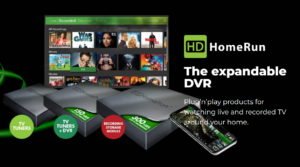
 When you cut the cord, installing a digital antenna is the easiest way to get free, live local channels like ABC, CBS, NBC, and Fox. But what happens when you are not home to watch your favorite broadcast, or two games are airing at the same time?
You need an OTA DVR (Over-The-Air Digital Video Recorder).
An OTA DVR replaces the traditional cable box. It allows you to pause, rewind, and record live television broadcast over an antenna. To build your ideal cord-cutting setup, you must choose between an all-in-one hardware device or a customizable software-based system. Here is a breakdown of how each method works and the top options available on the market.
Dedicated Hardware: Plug-and-Play OTA DVRs
Hardware DVRs are standalone devices. You plug your antenna into the device, connect it to your TV or home network, and use an included interface to manage your recordings. These are ideal if you want a straightforward, cable-like experience without the technical hassle of building your own server.
For more information, see our Guide explaining the new ATSC 3.0 NextGen TV Broadcasting.
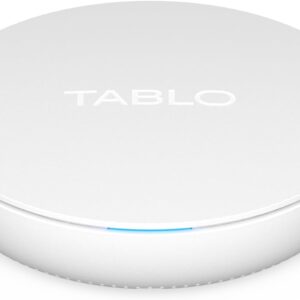
1. Tablo (4th Gen)
Tablo is a network-attached DVR, meaning it connects to your home Wi-Fi router rather than directly to a single TV. This allows you to stream your recorded shows to multiple smart TVs, streaming sticks (like Roku or Fire TV), or mobile devices simultaneously. The latest 4th Gen models are highly recommended for beginners because they include onboard storage and a free, 14-day TV guide with no monthly fee.
- Resolution Note: The Tablo 4th Gen models utilize ATSC 1.0 tuners. They do not support 4K (ATSC 3.0) broadcasts, capping out at high-definition 1080 resolution.
2. SiliconDust HDHomeRun
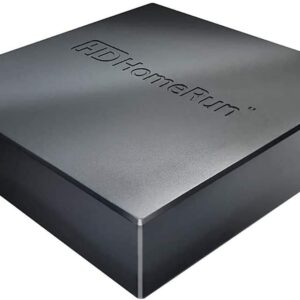
The HDHomeRun is the gold standard for network tuners. It takes your raw antenna signal and broadcasts it across your entire home network with zero loss in video quality. While you can plug an external hard drive into models like the HDHomeRun FLEX to record directly, it is most powerful when paired with dedicated DVR software (detailed below). It is the top choice for users who prioritize uncompressed picture quality, particularly for live sports.
- ATSC 3.0 Capability: If you intend to prepare for the future, the HDHomeRun FLEX 4K is the standard. It includes ATSC 3.0 tuners, enabling the reception of NextGen TV broadcasts in up to 4K resolution. Be aware that broadcasters occasionally apply DRM encryption to ATSC 3.0 channels, which can restrict recording and playback capabilities. For recording, you must attach an external hard drive or route the signal into dedicated DVR software.
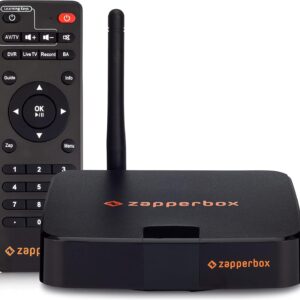
3. Zapperbox M1
Similar to the HDHomeRun, most Zapperbox models are equipped for ATSC 3.0 (NextGen TV) broadcasts. This standard offers 4K resolution and improved audio, making the Zapperbox M1 a solid choice for early adopters wanting to record high-end broadcasts. However, it is a standalone box that connects directly to your television via HDMI, making it an appropriate choice for users who want 4K broadcast capabilities without relying on a home network distribution model.
4. Mediasonic
If you are on a strict budget, Mediasonic produces basic digital converter boxes with built-in recording capabilities. The latest model is the Mediasonic HomeWorx (HW250STB). These are simple devices that plug straight into a single TV. You must supply your own USB flash drive or external hard drive to save the recordings. The interface is highly basic, but it is an inexpensive way to record a show without recurring fees. Be patient, they are in such high demand they are frequently out-of-stock.
5. TiVo (Edge / Roamio OTA, discontinued)
TiVo offered the most traditional cable-box experience and has been a very popular choice (See Note). But it typically required either a monthly subscription or a high upfront “lifetime” fee for its TV guide data. You might be able to pick one up at a 3rd party seller.
- Note on TiVo: TiVo officially discontinued manufacturing and selling its OTA DVR hardware (like the TiVo Edge) in late 2025. While legacy devices may still function for existing users, TiVo is no longer a viable hardware option for new cord-cutting setups. (Source: CordCutterNews.com)
Top Rated OTA DVRs
When you purchase through links on our site, we may earn an affiliate commission with no additional cost to you.
-

EyeTV U6 USB TV Tuner OTA ATSC HD TV, DVR for Mac
$88.99 -

HAUPPAUGE WinTV-DualHD Dual USB 2.0 HD TV Tuner for Windows PC 1595
$69.90 -

Mediasonic HW250STB ATSC Digital Converter Box TV Tuner DVR
$39.99 -

Tablo 4th Gen 2-Tuner (OTA) DVR
$59.97 -

SiliconDust HDHomeRun Flex Duo 2 x ATSC Tuners DVR – HDFX-2US
$109.99 -
Tablo 4th Gen 4-Tuner (OTA) DVR
$129.95 -
SiliconDust HDHomeRun Flex 4K ATSC 3.0 NextGen TV: 2/4 Tuners DVR HDFX-4K
$199.99 -
ZapperBox M1 ATSC 3.0 OTA Dual Tuner + DVR + Gateway with 4K HDR
$274.95
Software Solutions: Build Your Own DVR
If you already own a powerful streaming box (like an Nvidia Shield TV Pro), a desktop computer, or a Network Attached Storage (NAS) drive, you can build your own DVR. By combining a network tuner (like the HDHomeRun) with specialized media server software, you gain complete control over your home entertainment system.
1. Plex DVR
Plex is a robust media server platform that organizes your personal movies, music, and photos into a Netflix-style interface. By adding a compatible TV tuner and subscribing to a Plex Pass, you unlock its live TV and DVR capabilities, including commercial skipping. Plex allows you to record OTA television to your hard drive and stream it to any device, even when you are away from home (out-of-home streaming). Plex has also added an extensive catalogue of free streaming TV channels similar to Roku and Google TV offerings.
2. Jellyfin
Jellyfin has rapidly matured into a formidable, completely free alternative to Plex. As a volunteer-built, open-source platform, it requires zero licensing fees or premium subscriptions for its live TV and DVR capabilities. It handles post-processing for recordings and offers extensive customization. This is an excellent choice for users willing to manage their own server environment without being locked into a paid ecosystem.
3. Channels DVR
Channels DVR is widely considered a good software option for power users and sports fans who prioritize speed and interface fluidity. It integrates flawlessly with HDHomeRun tuners. While it requires a monthly subscription, it offers an incredibly fast interface, automatic commercial skipping, and the ability to seamlessly mix your OTA antenna channels with streaming internet channels into one unified guide.
4. Emby
Emby is a direct competitor to Plex and Jellyfin. It functions similarly, requiring you to host the server on your own hardware. Emby is highly customizable and generally handles live TV streaming slightly faster than Plex, making it a favorite for advanced cord-cutters who want granular control over how their media is managed and displayed.
Popular DVR Software
When you purchase through links on our site, we may earn an affiliate commission with no additional cost to you.





Which Route Should You Take?
Your choice depends on your technical comfort level and viewing habits:
- If you want easy setup and no monthly fees: Choose a hardware option like the Tablo. Understand that it is limited to 1080 HD.
- If you want the absolute best picture quality and flexibility: Buy an HDHomeRun and pair it with Plex or Channels DVR.
- If you want open-source control and 4K capability: Acquire an HDHomeRun and manage the streams with Jellyfin.
- If you are on a strict budget: Grab a simple Mediasonic converter box and a USB drive, also limited to 1080 HD.
Recording OTA TV is a simple process once you have the right tools. Review the options above, determine your budget, and select the system that best fits your home viewing needs.
Here’s a link to our Device Filter which will show you which external USB hard drives we have searched and suggest.